
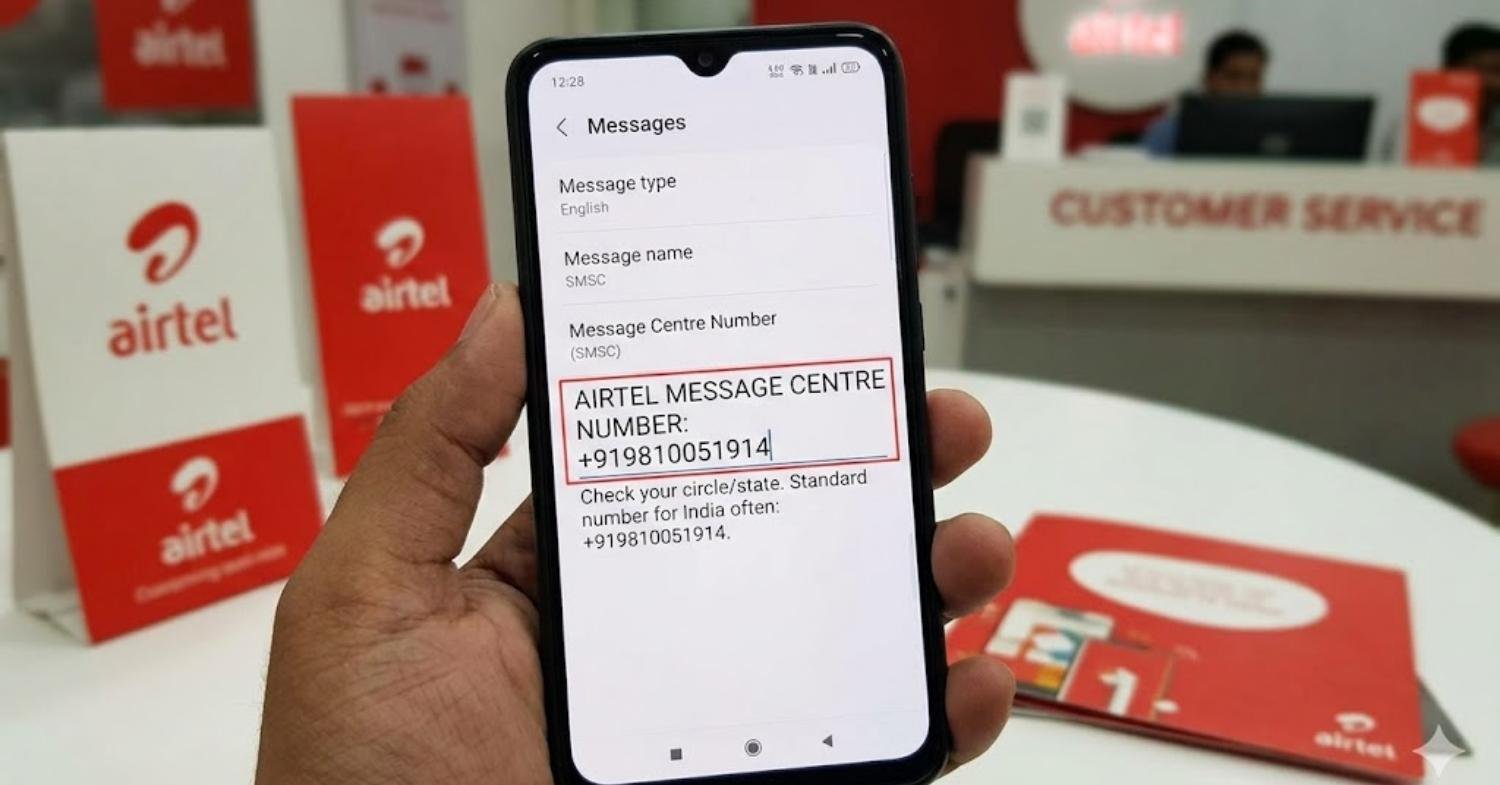

If your SMS suddenly stops working, it can feel bigger than a small phone issue. One minute you are trying to send a normal text, and the next minute your bank OTP, UPI verification, or signup code just will not go through. That is exactly why so many users start searching for the airtel message centre number in a panic.
- What Is Airtel Message Centre Number
- Airtel Message Centre Number List State Wise
- Airtel SMS Center Number for Airtel Prepaid and Postpaid
- How to Check Airtel Message Centre Number on Android
- Open your Messages or phone settings
- Compare the saved number
- Restart after checking
- How to Check Airtel Message Centre Number on iPhone
- How to Change Airtel Message Centre Number Easily
- Best way to update it safely
- Airtel Message Centre Number Not Working Fix
- Smart fixes to try
- Unable to Send SMS on Airtel Today
- Airtel OTP SMS Not Receiving Problem
- What to do first
- Correct Airtel SMSC Number Format with Country Code
- Airtel Message Centre Number for Delhi Mumbai UP and Other Circles
- Why Airtel SMS Fails Even After Setting the Correct Message Centre Number
- Airtel Message Centre Number for Banking and Verification SMS
- Airtel Network Settings for SMS Sending and Receiving
- Useful network checks
- Airtel Customer Care Help for Message Centre Number Issues
- Frequently Asked Questions
- What is the Airtel message centre number used for
- Can a wrong Airtel SMSC number block OTP messages
- Does Airtel prepaid need a separate SMS activation code
- Which Airtel support number should I call for SMS problems
- Is the Airtel message centre number the same in every state
- Conclusion
I have seen this problem come up most often when someone changes phones, resets network settings, ports to a new device, or inserts a fresh SIM. In many cases, the issue is not the Messages app at all. It is the SMSC setting, plan eligibility, signal quality, or a device-level bug. Airtel itself says SMS problems can happen on new SIMs and recommends checking the Airtel SMSC or contacting support.
In this guide, I will break down the airtel message centre number clearly, show the state-wise numbers Airtel has published, explain how to check or change the setting on Android and iPhone, and walk you through the real fixes that help when SMS, OTP, or verification texts are not working. I will also point out where official Airtel information ends, so you know what to trust first.
What Is Airtel Message Centre Number
The Airtel message centre number is the SMSC number used by your phone to route outgoing text messages through Airtel’s network. SMSC stands for Short Message Service Center. Airtel describes it as a service dedicated to SMS-related queries and resolution for users facing problems sending or receiving texts.
In simple words, if this number is missing, wrong, or unreadable on your phone, normal SMS may fail. That can affect:
- Personal text messages
- Banking verification messages
- OTP delivery
- UPI or app registration
- SIM activation related SMS
Airtel Message Centre Number List State Wise
Airtel has published a state-wise list of SMS service center numbers for several circles on its official blog. Here is the list Airtel shows:
- Bihar: +919831029416
- Delhi: +919810051914
- Maharashtra: +919898051916
- Karnataka: +919845086007
- Andhra Pradesh: +919849087001
- Madhya Pradesh: +919845086020
- Punjab: +919815051914
- Rajasthan: +919815051914
- Assam: +919818023015
- Gujarat: +919831029416
- Telangana: +919849087001
- Uttar Pradesh: +919810051914
- Orissa: +919818023015
- West Bengal: +919932029007
- Uttarakhand: +919845086020
- Himachal Pradesh: +919845086020
- Kerala: +919810051905
- Jharkhand: +919845086020
- Jammu and Kashmir: +919845086007
- Tamil Nadu: +919898051914
Airtel also says its SMS centers cover 20+ states and it is working to expand to the remaining states.
Airtel SMS Center Number for Airtel Prepaid and Postpaid

The SMSC concept is the same for both Airtel prepaid and Airtel postpaid. Your phone still needs the correct message centre setting for standard SMS to route properly. What changes more often is not the SMSC itself, but whether your plan supports outgoing SMS. Airtel says prepaid users should make sure their recharge includes SMS benefits, and it also notes that Truly Unlimited plans include free SMS.
So if you cannot send texts, check both things:
- The correct Airtel message centre number
- An active plan with SMS benefits
That simple combo solves a lot of cases.
How to Check Airtel Message Centre Number on Android
Android phones vary a lot by brand, so the exact menu may look different. Airtel’s own guidance says to open Settings, find a section like Network & Internet, then Call, then Advanced Settings, where you may see SMSC settings or SMS center number. It also notes that you can search for SMSC in the phone settings search bar because the path differs by device.
A practical Android method is:
Open your Messages or phone settings
Look inside:
- Settings
- Mobile network
- SIM settings
- Advanced settings
- SMSC settings
- Message center number
Compare the saved number
Check whether the number matches your original Airtel circle or state.
Restart after checking
After confirming or updating the number, restart the phone so the network reconnects cleanly. Airtel recommends restarting as a basic troubleshooting step.
How to Check Airtel Message Centre Number on iPhone
On iPhone, the SMSC field is often hidden from normal settings, which makes this issue more confusing. In many cases, users cannot directly edit the message centre number from the standard iOS menu. That means the best approach is usually to:
- Update carrier settings and iOS
- Reset network settings
- Reinsert the SIM
- Test SMS after a restart
- Contact Airtel if the issue continues
This matters because Airtel also advises keeping device software updated when SMS is not working.
If you use an iPhone and cannot find any SMSC field, do not panic. That is normal on many iOS versions. Focus on network reset, signal, plan status, and Airtel support instead.
How to Change Airtel Message Centre Number Easily

Airtel says you can change the number from your phone by locating the SMSC settings or SMS center number field and updating it with the correct number for your state. It also recommends trying simpler fixes first before editing the SMS center number.
Best way to update it safely
- Find your original Airtel circle
- Open SMSC settings on your phone
- Enter the number exactly
- Save the setting
- Restart the device
- Send a test SMS to a known number
Do not guess the number. Use the correct circle-based number, because a wrong entry can make the problem worse.
Airtel Message Centre Number Not Working Fix
If the saved number still does not solve the problem, the issue may be elsewhere. Airtel’s official troubleshooting tips include restarting the phone, deleting unnecessary SMS, clearing the Messages app cache, updating phone software, and contacting customer care if the issue continues.
Smart fixes to try
Restart your phone
This reconnects your device to the network and often fixes temporary SMS glitches.
Clear old messages
Airtel says some messaging apps hit storage limits, which can stop new messages from working properly.
Clear app cache
A bloated cache can slow the app or interrupt normal SMS behavior.
Update the software
Bug fixes in OS updates can solve messaging issues.
Check your recharge or bill status
No SMS benefit or service suspension can block outgoing texts.
Unable to Send SMS on Airtel Today
If you are unable to send SMS on Airtel today, do not assume it is always the message centre number. The problem may be caused by:
- No active SMS pack
- Weak network signal
- Newly activated SIM
- Wrong SMSC
- Device bug
- App cache issue
- Temporary network-side problem
Airtel says new SIM cards can face SMS issues and may need support assistance. It also says active SIM registration is enough to activate SMS service, and users can send their 20-digit SIM number to 121 as part of the SIM activation process.
A quick test is to send a plain text to a friend. If that fails, try after a restart and verify both plan and SMSC.
May you like also: 150+ Birthday Message for Husband: Romantic Wishes
Airtel OTP SMS Not Receiving Problem
This is one of the most frustrating cases because you may still receive promotional messages but fail to get OTPs. OTP problems are not always caused by SMSC alone. They can also happen because of poor reception, DND-related confusion, app-side delays, or network registration issues.
Airtel specifically highlights OTP dependence and says many verification processes rely on working SMS service. It also recommends checking signal strength, plan status, and support if the issue does not go away.
What to do first
- Confirm your Airtel message centre number
- Check network bars
- Move to a better coverage area
- Restart the phone
- Make sure the SIM is active
- Try another SMS app if needed
- Contact Airtel if banking or UPI OTP still fails
Correct Airtel SMSC Number Format with Country Code
Most Airtel SMSC entries are shown with the India country code, which means they begin with +91 on official Airtel material. For example, Delhi is listed as +919810051914 and Maharashtra as +919898051916.
That means the safe format is usually:
+91 followed by the circle-specific SMSC number
If your phone accepts only digits, it may store the same number without spaces or symbols. The main thing is to enter the exact full value for your circle.
Airtel Message Centre Number for Delhi Mumbai UP and Other Circles

From Airtel’s official published list:
- Delhi: +919810051914
- Uttar Pradesh: +919810051914
- Maharashtra: +919898051916
A recent Gadgets 360 guide lists some additional circle references such as Mumbai 9898051916, Haryana 9810051914, and Tamil Nadu 9898051914. Because those values are not from Airtel’s own support page, it is best to treat them as secondary references and confirm with Airtel before manually saving them on your phone.
If your circle is missing from Airtel’s blog, contact support first rather than guessing.
Why Airtel SMS Fails Even After Setting the Correct Message Centre Number
This is where many users get stuck. They set the right number, restart the phone, and SMS still does not work. In that case, the real reason is usually one of these:
- Your recharge does not include SMS
- Your SIM is newly activated
- Network reception is weak
- The device has a software or messaging app bug
- The phone has not refreshed carrier settings
- The issue is on the Airtel side and needs support
Airtel’s published troubleshooting advice strongly supports these possibilities.
Airtel Message Centre Number for Banking and Verification SMS
Banking, UPI, wallet apps, and government services often depend on standard SMS routing. Airtel points out that many online verification steps rely on Aadhaar-generated OTP and similar SMS-based confirmation. If your Airtel message centre number is wrong, these services may break.
That is why this issue feels urgent. It is not just about chatting. It can block:
- Bank account registration
- UPI onboarding
- SIM-based app verification
- Login authentication
- Aadhaar or KYC workflows
If you rely on these services, fix the SMS problem first before retrying too many OTP requests.
See also: 370+ Thank You Message for Wedding Invitation Ideas
Airtel Network Settings for SMS Sending and Receiving
Besides the message centre number, your network setup matters. Airtel recommends checking tower reception and software status when SMS is not working.
Useful network checks
Signal strength
Low coverage can delay or block SMS.
SIM placement
Remove and reinsert the SIM to refresh network registration.
Airplane mode reset
Turn Airplane mode on for 15 seconds, then off.
Network settings reset
This can fix hidden carrier or SIM profile issues.
Default SMS app
Make sure one stable app is set as default.
These steps are simple, but they often work before anything more technical is needed.
Airtel Customer Care Help for Message Centre Number Issues

When self-troubleshooting does not work, Airtel’s official contact page says:
- Call 121 from your Airtel number for enquiries and requests
- Call 198 for complaints
- Use the Airtel app for help and support
This is the best next step when:
- Your circle number is unclear
- Your phone does not show SMSC settings
- Your SIM is active but SMS still fails
- OTP issues are affecting banking or UPI
- You need confirmation for a missing state or circle
Frequently Asked Questions
What is the Airtel message centre number used for
It is the SMSC number your phone uses to route outgoing text messages through Airtel’s network. If it is wrong, SMS may fail.
Can a wrong Airtel SMSC number block OTP messages
Yes, it can interfere with normal SMS routing, which may affect OTP and verification texts. Airtel also highlights the importance of working SMS for OTP-based services.
Does Airtel prepaid need a separate SMS activation code
Airtel says there is no separate SMS activation code as such. Activating the SIM is generally enough, but your plan must support SMS.
Which Airtel support number should I call for SMS problems
Airtel says 121 is for enquiries and requests, while 198 is for complaints.
Is the Airtel message centre number the same in every state
No. Airtel publishes different numbers for different circles and states, so you should use the one for your original region.
Conclusion
The airtel message centre number is one of the first things to check when SMS, OTP, or verification texts stop working, but it is not the only reason messages fail. The real fix often comes from combining the correct SMSC, an active SMS-enabled plan, good signal, updated software, and a quick restart. Once you follow the steps in order, most SMS issues become much easier to diagnose.
If your texts still are not going through, do not keep guessing. Use the Airtel state-wise list, test the setting carefully, and contact Airtel on 121 or 198 for circle-specific help. That saves time and helps you get your messages, OTPs, and banking verification working again faster.


